
Peptide Calculator 2026: How to Dose and Reconstitute
Peptide Calculator 2026: How to Dose and Reconstitute
A peptide calculator solves two problems: reconstitution (how much bacteriostatic water to add to a vial) and dosing (how much liquid to draw for a target dose). The core formula is concentration = vial mass ÷ diluent volume, then dose volume = target dose ÷ concentration. This guide breaks down manual math, syringe unit conversions, weight-based dosing, and how app tools like Pep extend the basic calculator into full protocol tracking.
Table of Contents
- What a Peptide Calculator Actually Does
- How to Use a Peptide Calculator Step by Step
- Peptide Reconstitution Calculator Online: The Core Formula
- Peptide Calculator Vial Size: mg to mL Examples
- Bacteriostatic Water and Why It Matters
- Peptide Dosage Calculator for Injections
- Converting to U-100 Syringe Units
- How to Calculate Peptide Dosage Manually
- Weight-Based Dosing Calculations
- Peptide Molecular Weight and Sequence Calculators
- Free Peptide Calculator Tools Compared
- Best Peptide Calculator App for Ongoing Tracking
- Why ‘Research Use Only’ Labels Matter
- Common Peptide Calculator Mistakes to Avoid
What a Peptide Calculator Actually Does
A peptide calculator solves two related but distinct math problems that trip people up constantly: how much liquid to mix into a freeze-dried peptide vial, and how much of that liquid to draw into a syringe for a single dose. Most calculators built for this purpose — including tools from Omni Calculator, CertaPeptides, and Professor Peptides — take three inputs (vial mass in mg, diluent volume in mL, and target dose in mcg or mg) and return a concentration plus a draw volume. Some go further, converting that volume into U-100 insulin syringe units. A smaller category of tool, like Biosynth’s peptide calculator, has nothing to do with dosing at all — it calculates chemical properties of an amino acid sequence, such as molecular weight, isoelectric point, and net charge. Knowing which type of calculator you’re looking at matters, because the inputs and outputs are entirely different despite the shared name. This guide walks through both categories in detail, plus weight-based dosing and app-based tracking for people running multi-week peptide protocols in 2026.
How to Use a Peptide Calculator Step by Step
Using a peptide calculator online generally follows the same four-step flow regardless of which tool you pick, and this sequence works whether you’re using a free web tool or doing the math by hand. First, enter the vial’s peptide mass in milligrams — this is printed on the vial label, with common sizes being 2 mg, 5 mg, and 10 mg. Second, enter the volume of bacteriostatic water you plan to add, typically 1–3 mL depending on how concentrated you want the final solution. Third, enter your target dose, usually expressed in micrograms or milligrams per injection. Fourth, hit calculate — the tool returns the resulting concentration in mg/mL and the exact volume to draw for that dose, often also expressed in U-100 syringe units so you don’t have to convert manually. The output is only as accurate as the inputs, so double-check the vial label and your intended diluent volume before trusting the result, especially if you’re switching between vial sizes or changing your protocol partway through.
Peptide Reconstitution Calculator Online: The Core Formula
Every peptide reconstitution calculator, whether it’s a polished web app or a simple spreadsheet, runs on the same underlying formula. Concentration equals vial mass divided by diluent volume — so a 5 mg vial mixed with 2 mL of bacteriostatic water produces a concentration of 2.5 mg/mL. From there, dose volume equals target dose divided by concentration. If your target dose is 250 mcg (0.25 mg), you’d divide 0.25 by 2.5 to get 0.1 mL as your draw volume. CertaPeptides describes reconstitution essentially as dividing a fixed mass of peptide across a volume of water, which is the simplest way to think about it. Online calculators automate this two-step math and often add unit conversions, but understanding the underlying formula means you can verify any tool’s output or do the calculation yourself with nothing more than a calculator app, which matters if you ever find yourself without internet access mid-protocol.
Peptide Calculator Vial Size: mg to mL Examples
Vial size is the first input any peptide calculator needs, and it’s worth understanding how different sizes change your math. A 2 mg vial reconstituted with 1 mL of bacteriostatic water yields a 2 mg/mL concentration — a fairly strong solution suited to smaller draw volumes. A 5 mg vial mixed with 2 mL also yields 2.5 mg/mL, a common middle-ground setup. A 10 mg vial mixed with 3 mL yields roughly 3.33 mg/mL. According to Professor Peptides, typical vial sizes are 2 mg, 5 mg, or 10 mg, most often reconstituted with 1–3 mL of bacteriostatic water. Choosing more diluent gives you finer control over small doses because each unit on the syringe represents less peptide, while less diluent concentrates the dose into a smaller draw volume — useful if you’re trying to minimize injection volume. Whichever vial size you’re working with, running the numbers through a calculator before you draw anything into a syringe is the safest habit to build.
Bacteriostatic Water and Why It Matters
Bacteriostatic water is sterile water containing a small percentage of benzyl alcohol, which inhibits bacterial growth and allows a reconstituted vial to be used across multiple doses over days or weeks rather than requiring immediate single use. Plain sterile water offers no antimicrobial protection once the vial’s seal has been punctured repeatedly, so it typically must be used right away. When a peptide calculator asks for diluent volume, it’s almost always assuming bacteriostatic water rather than plain sterile water, because the entire premise of a multi-dose vial depends on that antimicrobial property. Most peptide suppliers and calculator tools, including CertaPeptides and Professor Peptides, assume bacteriostatic water as the default diluent in their reconstitution formulas. Bacteriostatic water is typically sold in 3 mL, 10 mL, or 30 mL multi-dose vials, and leftover volume after reconstituting a peptide vial can usually be stored for future use if refrigerated and kept sealed. Because the benzyl alcohol concentration is fixed, adding more or less bacteriostatic water only changes the resulting peptide concentration — exactly the variable a reconstitution calculator solves for.
Peptide Dosage Calculator for Injections
A peptide dosage calculator for injections takes the concentration you’ve already established during reconstitution and turns it into a specific, repeatable draw volume for every dose you administer. The process starts with your known concentration in mg/mL — say 2.5 mg/mL from a 5 mg vial mixed with 2 mL of bacteriostatic water — and your prescribed or research target dose, often given in micrograms. Dividing the target dose by the concentration gives the volume to draw into the syringe for that single injection. For example, a 300 mcg (0.3 mg) target dose at 2.5 mg/mL requires drawing 0.12 mL. Good injection calculators also flag when a calculated draw volume is too small to measure accurately on a standard syringe, which usually means you need more diluent or a different syringe type. Recalculating after any change to vial size, diluent volume, or target dose is essential, since reusing an old draw volume with new inputs is one of the most common dosing mistakes people make with peptides.
Converting to U-100 Syringe Units
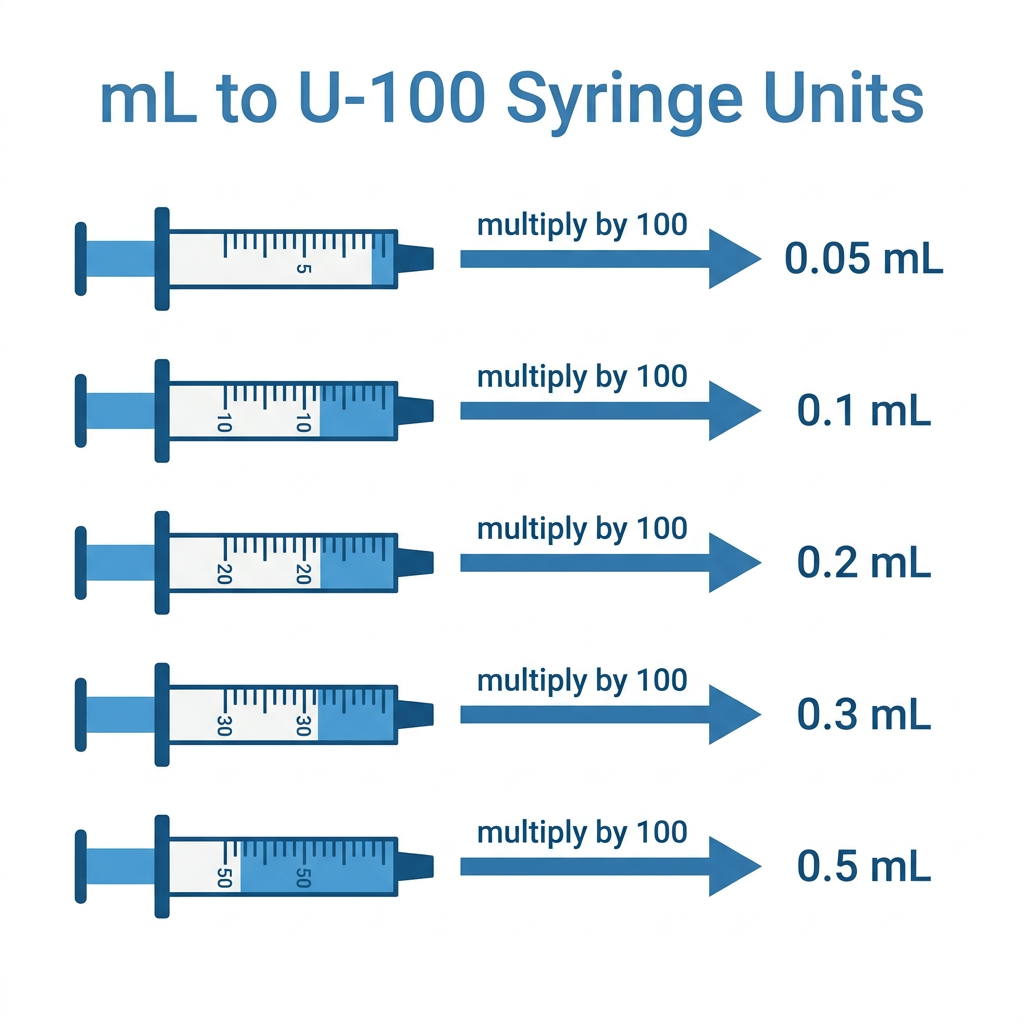
U-100 insulin syringes are marked in units where 100 units equals 1 mL, which makes them the standard tool for measuring the small volumes typical of peptide dosing. Converting a draw volume in milliliters to syringe units is simple: multiply the mL figure by 100. A draw volume of 0.05 mL becomes 5 units, 0.1 mL becomes 10 units, 0.2 mL becomes 20 units, and 0.5 mL becomes 50 units. Most online peptide calculators, including those referenced by Omni Calculator, perform this conversion automatically alongside the mL result so you can read your syringe barrel directly without doing mental math before every injection. U-100 syringes are typically graduated in 1-unit or 2-unit increments, and misreading the barrel by even a few units can meaningfully change a small peptide dose. If your calculated draw volume converts to a fraction of a unit — like 2.3 units — you’ll need a more diluted reconstitution or a finer syringe to measure it precisely, which is why choosing diluent volume thoughtfully pays off at injection time.
How to Calculate Peptide Dosage Manually
To calculate a peptide dose manually, you only need a basic calculator and two formulas. First, find your concentration: divide the vial’s total mass in mg by the mL of bacteriostatic water you added. A 10 mg vial mixed with 2 mL gives a concentration of 5 mg/mL. Second, convert your target dose to the same unit as your concentration — if your dose is in mcg, divide by 1000 to get mg. Third, divide your target dose by the concentration to get your draw volume in mL. A 500 mcg (0.5 mg) target at 5 mg/mL gives 0.1 mL. Fourth, multiply that mL figure by 100 to get U-100 syringe units, landing at 10 units in this example. Writing these numbers down before each new vial — concentration, target dose, draw volume, and unit equivalent — creates a simple reference sheet that removes the need to redo the math before every injection, and it’s a useful cross-check even when using an automated tool.
Weight-Based Dosing Calculations
A weight-based peptide calculator handles compounds where the target dose scales with body mass rather than staying fixed. Instead of entering a flat target dose in mcg or mg, you enter a dosage-per-kilogram figure along with your body weight, and the calculator multiplies the two to produce your actual target dose before running the usual concentration and draw-volume math. For example, a protocol calling for 2 mcg per kg for someone weighing 80 kg works out to a 160 mcg target dose, which then gets divided by the vial’s concentration to find the draw volume. Omni Calculator’s peptide tool includes exactly this kind of body-mass option, letting users skip the manual multiplication step. Weight-based dosing matters most for compounds where research or clinical guidance expresses dosage relative to body mass rather than as a flat number. It’s worth confirming whether your specific peptide protocol is meant to be dosed this way before assuming a flat mcg target applies, since the wrong dosing model can meaningfully over- or under-dose a given body weight.
Peptide Molecular Weight and Sequence Calculators
A peptide molecular weight and sequence calculator answers a completely different question than a dosing tool: it computes chemical properties of an amino acid sequence for research and lab purposes rather than reconstitution math. Tools like Biosynth’s peptide calculator take a raw amino acid sequence as input and return molecular weight, isoelectric point (pI), GRAVY score (a measure of hydrophobicity), and net charge at a given pH. These figures matter for researchers designing synthesis protocols, predicting solubility, or selecting purification methods, but they have no bearing on how much bacteriostatic water to add to a vial or how much to draw into a syringe. The confusion between these two calculator types is common precisely because both are labeled ‘peptide calculator,’ but a sequence calculator’s inputs are letters representing amino acids, while a dosing calculator’s inputs are numbers representing mass and volume. If a tool asks for a sequence spelled out in amino acid codes rather than a vial mass in mg, you’re on the wrong type of calculator for dosing purposes.
Free Peptide Calculator Tools Compared
Several free peptide calculator tools are available online, and while they largely agree on the underlying formula, they differ in extra features and presentation. Omni Calculator offers a general-purpose dosage calculator with an optional body-weight mode for per-kg dosing. CertaPeptides keeps things simple with a straightforward reconstitution-and-dose interface aimed at research users. Professor Peptides provides guidance alongside its calculator about typical vial sizes and diluent volumes, which is helpful for people new to reconstitution math. Other tools, like the one referenced by Aero Peptides, calculate doses per vial by dividing vial mass by dose amount, framing the output slightly differently but arriving at compatible numbers. None of these single-use web calculators track your dosing history over time, remind you when a vial is running low, or log injection sites — they’re built to answer one calculation at a time, which is useful for a quick check but limited for anyone managing a multi-week protocol with several compounds running concurrently.

Best Peptide Calculator App for Ongoing Tracking
The best peptide calculator app for ongoing tracking is one that goes beyond a single reconstitution or dose calculation and manages an entire protocol over time. A one-time web calculator answers ‘how much do I draw today,’ but it doesn’t remember your vial’s remaining volume tomorrow, remind you which injection site to rotate to next, or log whether you experienced side effects after a specific dose. Pep is built specifically to fill that gap: it performs the same reconstitution and dose math as a standalone calculator, but layers on dose scheduling, injection site rotation tracking, symptom logging, and inventory alerts so you always know how much peptide is left in a given vial without re-measuring. This matters most for people running GLP-1 or TRT protocols that span weeks or months and involve multiple compounds with different reconstitution ratios and dosing schedules, where relying on memory or a scratch pad of past calculations becomes error-prone. Apps like PepCalc focus specifically on reconstitution math, but pairing that calculation with ongoing protocol tracking is where a dedicated app like Pep adds the most value over a single-use tool.
Why ‘Research Use Only’ Labels Matter
Most peptide calculators and the peptides they’re paired with online carry a ‘research use only’ label, and that label carries real legal and safety weight rather than being boilerplate text. Aero Peptides explicitly marks its reconstitution calculator this way, reflecting how most peptides sold online are marketed — not as approved medications for human use, but as compounds intended for laboratory research. This distinction matters because a calculator’s arithmetic is accurate regardless of the label, but the label signals that the underlying product hasn’t gone through the regulatory approval, quality testing, and dosing validation that prescription medications undergo. Anyone using peptides therapeutically, whether for weight management, hormone therapy, or recovery, should work with a licensed prescriber who can source pharmaceutical-grade product and adjust dosing based on bloodwork and individual health factors. A calculator can tell you the math, but it can’t tell you whether a given dose or compound is appropriate for your specific medical situation. Treating the research-use-only label as a meaningful signal, rather than skipping past it, is part of using these tools responsibly.
Common Peptide Calculator Mistakes to Avoid
A handful of recurring mistakes account for most peptide calculator errors, and nearly all of them come from mismatched inputs rather than bad math. The most common is forgetting to recalculate after switching vial sizes or diluent volumes — a draw volume calculated for a 2 mg vial doesn’t carry over to a 10 mg vial even if the target dose stays the same. Another is mixing units, such as entering a dose in mcg but reading the concentration in mg/mL without converting, which produces a draw volume off by a factor of 1000. A third mistake is assuming plain sterile water behaves like bacteriostatic water in the formula; the math is identical, but the safety and shelf-life implications are not. Finally, people sometimes trust a syringe unit conversion without checking that their syringe is actually U-100, since U-40 and other syringe types use different unit-to-volume ratios entirely. Slowing down to confirm vial mass, diluent volume, target dose, and syringe type before every calculation prevents nearly all of these errors.
Frequently Asked Questions
What formula does a peptide calculator use?
Most peptide reconstitution calculators use concentration = vial mass ÷ diluent volume, then dose volume = target dose ÷ concentration. This two-step formula is used across tools like Omni Calculator, CertaPeptides, and Professor Peptides.
How do I convert peptide dose volume to syringe units?
Multiply the draw volume in milliliters by 100 to get U-100 insulin syringe units. For example, 0.1 mL equals 10 units, and 0.5 mL equals 50 units.
Are peptide calculators accurate for medical dosing?
They’re accurate for the arithmetic, but most are explicitly labeled research-use only and don’t account for individual health factors. Always confirm dosing with a licensed prescriber, especially for TRT or GLP-1 medications.
What’s the difference between a reconstitution calculator and a sequence calculator?
A reconstitution calculator computes mixing ratios and injection volumes for dosing. A sequence calculator, like Biosynth’s, computes chemical properties such as molecular weight and isoelectric point from an amino acid sequence — it has nothing to do with dosing.
Can an app replace a one-time peptide calculator?
Yes — apps like Pep combine the reconstitution math with ongoing dose scheduling, injection site rotation, symptom logging, and inventory tracking, which a single-use calculator can’t do.
What is bacteriostatic water and why do calculators assume it?
Bacteriostatic water contains a small amount of benzyl alcohol that inhibits bacterial growth, allowing a reconstituted vial to be used for multiple doses over time. Most peptide calculators assume it as the default diluent because plain sterile water lacks this preservative property.
What’s the most common peptide calculator mistake?
Forgetting to recalculate after switching vial sizes, diluent volumes, or target doses is the most common mistake, since an old draw volume doesn’t carry over correctly to new inputs.